Before Connecting Your ERP and Online Store, Map the Workflow.
By Fairlogs Integration Team
•
August 2026
•
8 min read
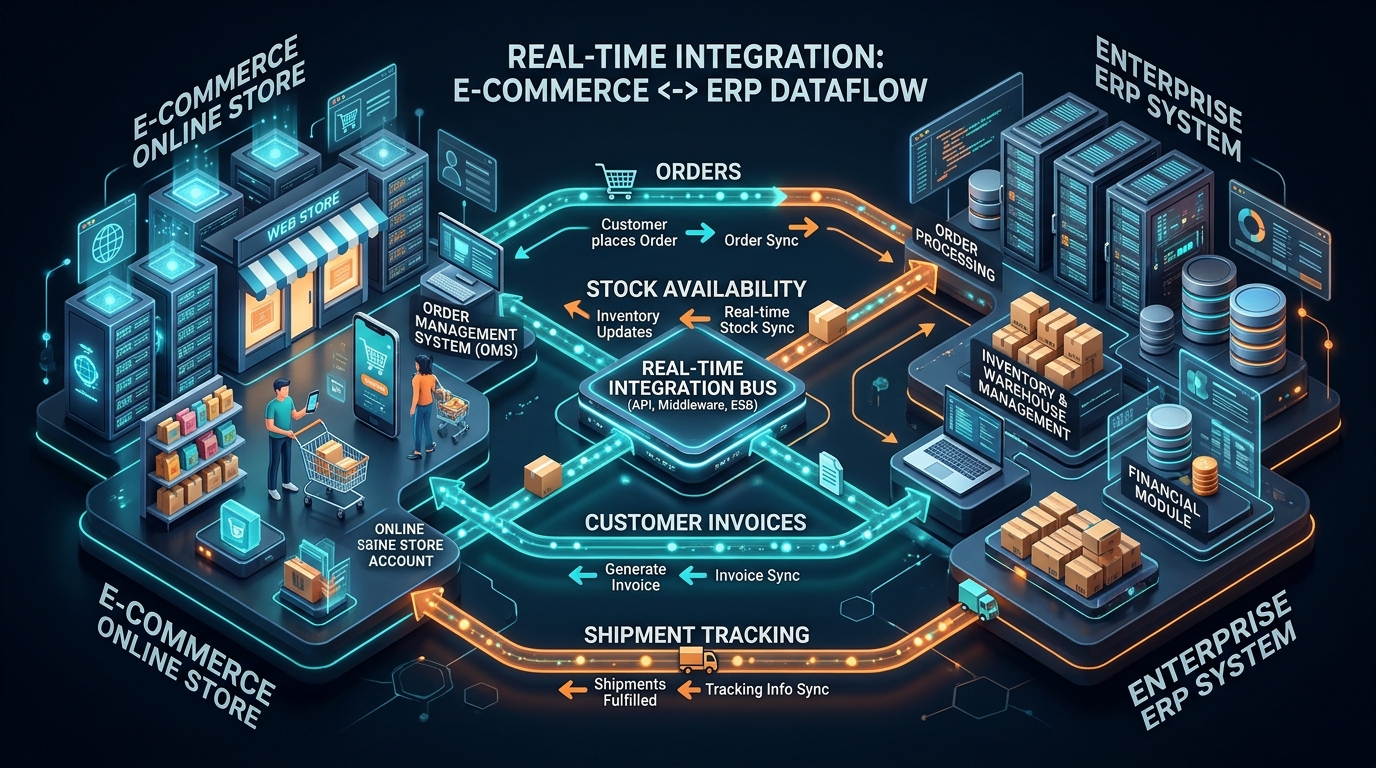
Connecting an online store to an ERP sounds straightforward until the two systems disagree about product identifiers, stock availability, order status, taxes, or customer records. A reliable integration begins with a shared understanding of the business process.
Decide which system owns each record
Choose the source of truth for products, prices, inventory, customers, and orders. Without this decision, updates can overwrite each other or create conflicting information.
Define when information moves
Some changes should happen immediately. Others can be synchronized on a schedule. The right choice depends on business impact, platform limits, and operational needs.
Map exceptions early
Consider cancelled orders, returns, partial fulfillment, duplicate events, unavailable products, and failed updates. These are normal operational situations, not unusual edge cases.
Design for retries and visibility
An integration should record failures, support safe retries, and make it possible to identify records that need attention. Silent failures create expensive manual work.
Test with realistic records
Use representative products, taxes, discounts, shipping methods, and order scenarios. Validate the behavior before moving live business data.
Start with the essential flow
A limited integration that handles core processes reliably is often more valuable than a broad one with unclear responsibilities.
Next step
Discuss Your Integration
Speak directly with our technical team.
Contact Us
Website FAQ
URL: /faq/
SEO title: Software Development FAQs | Fairlogs
Meta description: Answers to common questions about software development, AI integration, project scope, modernization, and working with Fairlogs.